> ## Documentation Index
> Fetch the complete documentation index at: https://wb-21fd5541-update-reference-docs-40.mintlify.site/llms.txt
> Use this file to discover all available pages before exploring further.
# Instructor
> Trace structured data extraction from LLMs with Weave's Instructor integration, capturing Pydantic validation and retry logic.
 [Instructor](https://python.useinstructor.com/) is a lightweight library for getting structured data like JSON from LLMs. This guide shows you how to trace Instructor calls with Weave so you can debug structured extraction, capture Pydantic validation, and inspect retry logic.
## Tracing
It's important to store traces of language model applications in a central location, both during development and in production. These traces can be useful for debugging, and as a dataset that will help you improve your application.
Weave automatically captures traces for [Instructor](https://python.useinstructor.com/). To start tracking, call `weave.init(project_name="[YOUR-WANDB-PROJECT-NAME]")` and use the library as normal.
```python lines theme={null}
import instructor
import weave
from pydantic import BaseModel
from openai import OpenAI
# Define your desired output structure
class UserInfo(BaseModel):
user_name: str
age: int
# Initialize Weave
weave.init(project_name="instructor-test")
# Patch the OpenAI client
client = instructor.from_openai(OpenAI())
# Extract structured data from natural language
user_info = client.chat.completions.create(
model="gpt-3.5-turbo",
response_model=UserInfo,
messages=[{"role": "user", "content": "John Doe is 30 years old."}],
)
```
|
[Instructor](https://python.useinstructor.com/) is a lightweight library for getting structured data like JSON from LLMs. This guide shows you how to trace Instructor calls with Weave so you can debug structured extraction, capture Pydantic validation, and inspect retry logic.
## Tracing
It's important to store traces of language model applications in a central location, both during development and in production. These traces can be useful for debugging, and as a dataset that will help you improve your application.
Weave automatically captures traces for [Instructor](https://python.useinstructor.com/). To start tracking, call `weave.init(project_name="[YOUR-WANDB-PROJECT-NAME]")` and use the library as normal.
```python lines theme={null}
import instructor
import weave
from pydantic import BaseModel
from openai import OpenAI
# Define your desired output structure
class UserInfo(BaseModel):
user_name: str
age: int
# Initialize Weave
weave.init(project_name="instructor-test")
# Patch the OpenAI client
client = instructor.from_openai(OpenAI())
# Extract structured data from natural language
user_info = client.chat.completions.create(
model="gpt-3.5-turbo",
response_model=UserInfo,
messages=[{"role": "user", "content": "John Doe is 30 years old."}],
)
```
|  |
| ---------------------------------------------------------------------------------------------------------------------------------------------------------------------------------------------------------------------------------------------------------------------------------------------------------------------------------------------------------------------------------------------------------------------------------------------------------------- |
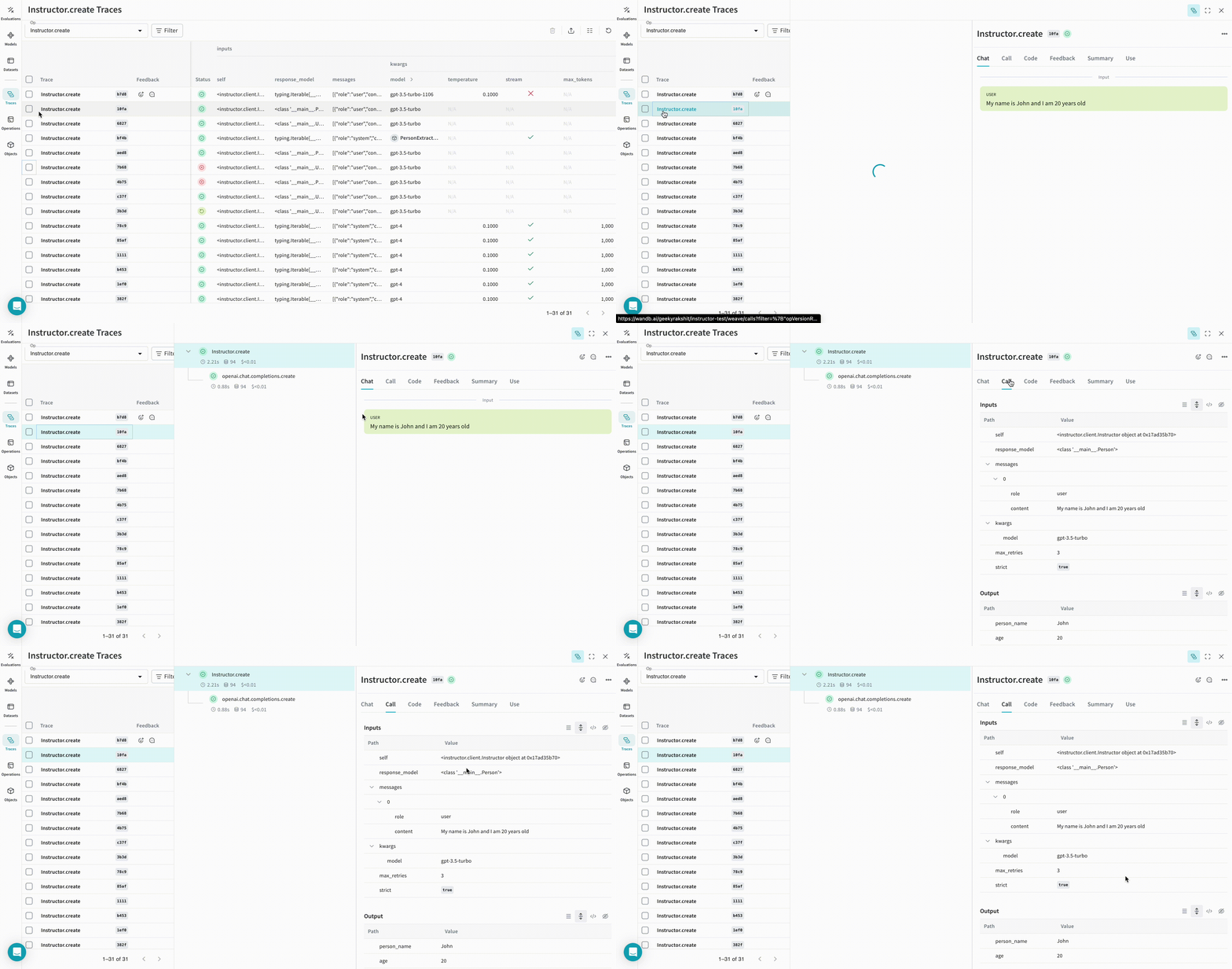
| Weave tracks and logs all LLM calls made using Instructor. You can view the traces in the Weave web interface. |
## Track your own ops
Wrapping a function with `@weave.op` starts capturing inputs, outputs, and app logic so you can debug how data flows through your app. You can deeply nest ops and build a tree of functions that you want to track. This also starts automatically versioning code as you experiment, capturing ad hoc details that haven't been committed to Git.
Create a function decorated with [`@weave.op`](/weave/guides/tracking/ops).
In the following example, the `extract_person` function is the metric function wrapped with `@weave.op`. This lets you see intermediate steps, such as the OpenAI chat completion call.
```python lines theme={null}
import instructor
import weave
from openai import OpenAI
from pydantic import BaseModel
# Define your desired output structure
class Person(BaseModel):
person_name: str
age: int
# Initialize Weave
weave.init(project_name="instructor-test")
# Patch the OpenAI client
lm_client = instructor.from_openai(OpenAI())
# Extract structured data from natural language
@weave.op()
def extract_person(text: str) -> Person:
return lm_client.chat.completions.create(
model="gpt-3.5-turbo",
messages=[
{"role": "user", "content": text},
],
response_model=Person,
)
person = extract_person("My name is John and I am 20 years old")
```
|
|
| ---------------------------------------------------------------------------------------------------------------------------------------------------------------------------------------------------------------------------------------------------------------------------------------------------------------------------------------------------------------------------------------------------------------------------------------------------------------- |
| Weave tracks and logs all LLM calls made using Instructor. You can view the traces in the Weave web interface. |
## Track your own ops
Wrapping a function with `@weave.op` starts capturing inputs, outputs, and app logic so you can debug how data flows through your app. You can deeply nest ops and build a tree of functions that you want to track. This also starts automatically versioning code as you experiment, capturing ad hoc details that haven't been committed to Git.
Create a function decorated with [`@weave.op`](/weave/guides/tracking/ops).
In the following example, the `extract_person` function is the metric function wrapped with `@weave.op`. This lets you see intermediate steps, such as the OpenAI chat completion call.
```python lines theme={null}
import instructor
import weave
from openai import OpenAI
from pydantic import BaseModel
# Define your desired output structure
class Person(BaseModel):
person_name: str
age: int
# Initialize Weave
weave.init(project_name="instructor-test")
# Patch the OpenAI client
lm_client = instructor.from_openai(OpenAI())
# Extract structured data from natural language
@weave.op()
def extract_person(text: str) -> Person:
return lm_client.chat.completions.create(
model="gpt-3.5-turbo",
messages=[
{"role": "user", "content": text},
],
response_model=Person,
)
person = extract_person("My name is John and I am 20 years old")
```
|  |
| ------------------------------------------------------------------------------------------------------------------------------------------------------------------------------------------------------------------------------------------------------------------------------------------------------------------------------------------------------------------------------------------------------------------------------------------------------------------------------------------------------------------------------------------------------------------------------------------------------------------------------------------------------------------------------------------------------------------------------------------------------------------------------------------------------------------------------------------------------------------------------------------------------------------------------------------------------------------------------------------------------------------------------------------------------------------------------------------------------------------------------------------------------------------------------------------------------------------------------------------------------------------------------------------------------------------------------------------------------------------------------------------------------------------------------------------------------------------------------------------------------------------------------------------------------------------------------------------------------------------------------------------------------------------------------------------------------------------------------------------------------------------------------------------------------------------------------------------------------------------------------------------------------------------------------------------------------------------------------------------------- |
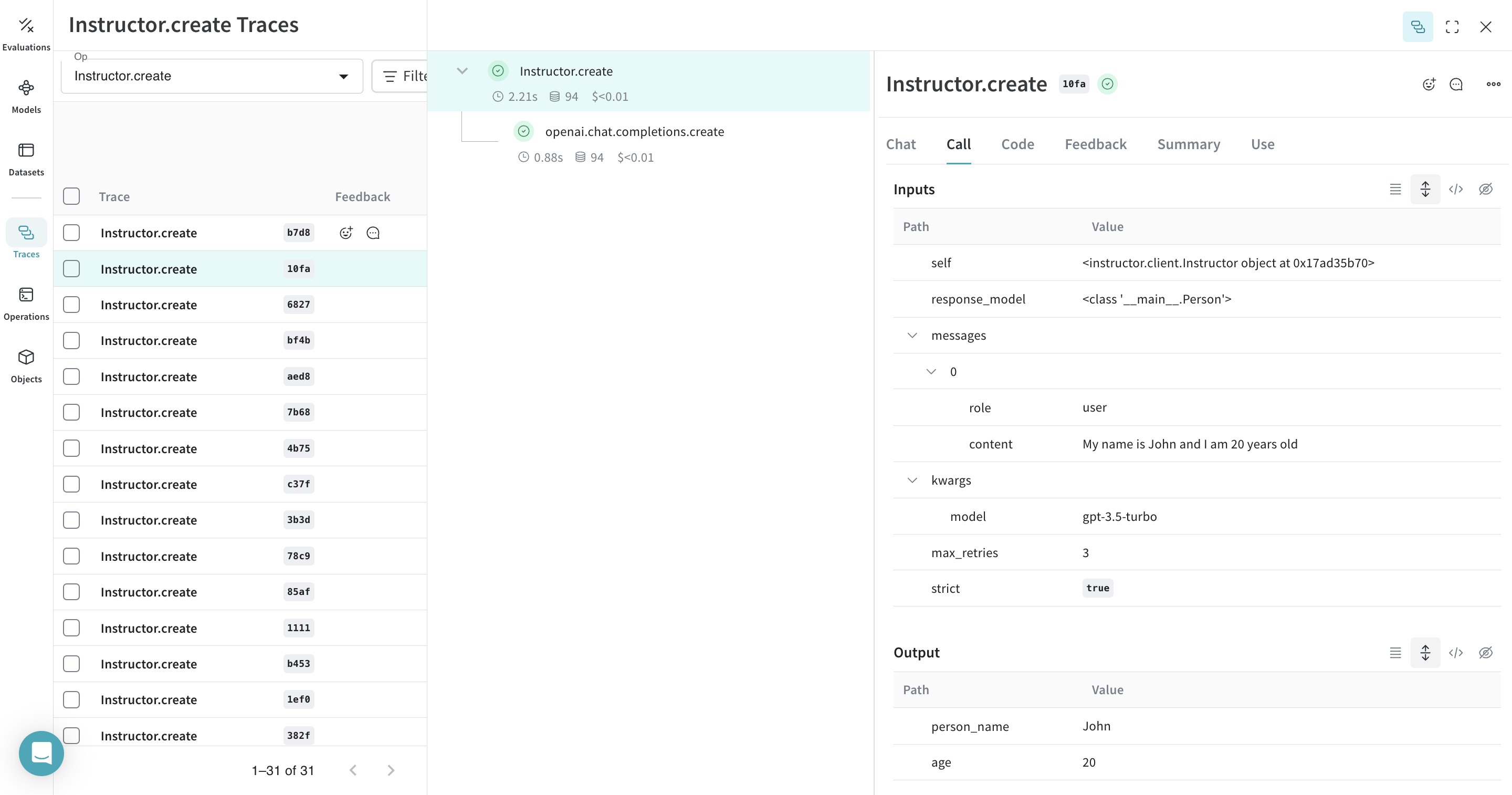
| Decorating the `extract_person` function with `@weave.op` traces its inputs, outputs, and all internal LM calls made inside the function. Weave also automatically tracks and versions the structured objects generated by Instructor. |
## Create a `Model` for easier experimentation
Organizing experimentation is difficult when there are many moving pieces. By using the [`Model`](../core-types/models) class, you can capture and organize the experimental details of your app like your system prompt or the model you're using. This helps organize and compare different iterations of your app.
In addition to versioning code and capturing inputs and outputs, [`Model`](../core-types/models)s capture structured parameters that control your application's behavior, so you can find which parameters worked best. You can also use Weave Models with [`serve`](#serve-a-weave-model) and [`Evaluation`](../core-types/evaluations)s.
In the following example, you can experiment with `PersonExtractor`. Every time you change one of these, you'll get a new *version* of `PersonExtractor`.
```python lines theme={null}
import asyncio
from typing import List, Iterable
import instructor
import weave
from openai import AsyncOpenAI
from pydantic import BaseModel
# Define your desired output structure
class Person(BaseModel):
person_name: str
age: int
# Initialize Weave
weave.init(project_name="instructor-test")
# Patch the OpenAI client
lm_client = instructor.from_openai(AsyncOpenAI())
class PersonExtractor(weave.Model):
openai_model: str
max_retries: int
@weave.op()
async def predict(self, text: str) -> List[Person]:
model = await lm_client.chat.completions.create(
model=self.openai_model,
response_model=Iterable[Person],
max_retries=self.max_retries,
stream=True,
messages=[
{
"role": "system",
"content": "You are a perfect entity extraction system",
},
{
"role": "user",
"content": f"Extract `{text}`",
},
],
)
return [m async for m in model]
model = PersonExtractor(openai_model="gpt-4", max_retries=2)
asyncio.run(model.predict("John is 30 years old"))
```
|
|
| ------------------------------------------------------------------------------------------------------------------------------------------------------------------------------------------------------------------------------------------------------------------------------------------------------------------------------------------------------------------------------------------------------------------------------------------------------------------------------------------------------------------------------------------------------------------------------------------------------------------------------------------------------------------------------------------------------------------------------------------------------------------------------------------------------------------------------------------------------------------------------------------------------------------------------------------------------------------------------------------------------------------------------------------------------------------------------------------------------------------------------------------------------------------------------------------------------------------------------------------------------------------------------------------------------------------------------------------------------------------------------------------------------------------------------------------------------------------------------------------------------------------------------------------------------------------------------------------------------------------------------------------------------------------------------------------------------------------------------------------------------------------------------------------------------------------------------------------------------------------------------------------------------------------------------------------------------------------------------------------------- |
| Decorating the `extract_person` function with `@weave.op` traces its inputs, outputs, and all internal LM calls made inside the function. Weave also automatically tracks and versions the structured objects generated by Instructor. |
## Create a `Model` for easier experimentation
Organizing experimentation is difficult when there are many moving pieces. By using the [`Model`](../core-types/models) class, you can capture and organize the experimental details of your app like your system prompt or the model you're using. This helps organize and compare different iterations of your app.
In addition to versioning code and capturing inputs and outputs, [`Model`](../core-types/models)s capture structured parameters that control your application's behavior, so you can find which parameters worked best. You can also use Weave Models with [`serve`](#serve-a-weave-model) and [`Evaluation`](../core-types/evaluations)s.
In the following example, you can experiment with `PersonExtractor`. Every time you change one of these, you'll get a new *version* of `PersonExtractor`.
```python lines theme={null}
import asyncio
from typing import List, Iterable
import instructor
import weave
from openai import AsyncOpenAI
from pydantic import BaseModel
# Define your desired output structure
class Person(BaseModel):
person_name: str
age: int
# Initialize Weave
weave.init(project_name="instructor-test")
# Patch the OpenAI client
lm_client = instructor.from_openai(AsyncOpenAI())
class PersonExtractor(weave.Model):
openai_model: str
max_retries: int
@weave.op()
async def predict(self, text: str) -> List[Person]:
model = await lm_client.chat.completions.create(
model=self.openai_model,
response_model=Iterable[Person],
max_retries=self.max_retries,
stream=True,
messages=[
{
"role": "system",
"content": "You are a perfect entity extraction system",
},
{
"role": "user",
"content": f"Extract `{text}`",
},
],
)
return [m async for m in model]
model = PersonExtractor(openai_model="gpt-4", max_retries=2)
asyncio.run(model.predict("John is 30 years old"))
```
|  |
| ------------------------------------------------------------------------------------------------------------------------------------------------------------------------------------------------------------------------------------------------------------------------------------------------------------------------------------------------------------------------------------------------------------------------------------------------------------------------------------------------------------------------------------------------------------------------------------------------------------------------------------------------------------------------------------------------------------------------------------------------------------------------------------------------------------------------------------------------------------------------------------------------------------------------------------------------------------------------------------------------------------------------------------------------------------------------------------------------------------------------------------------------------------------------------------------------------------------------------------------------------------------------------------------------------------------------------------------------------------------------------------------------------------------------------------------------------------------------------------------------------------------------------------------------------------------------------------------------------------------------------------------------------------------------------------------------------------------------------------------------------------------------------------------------------------------------------------------------------------------------------------------------------------------------------------------------------------------------------------------------------------------ |
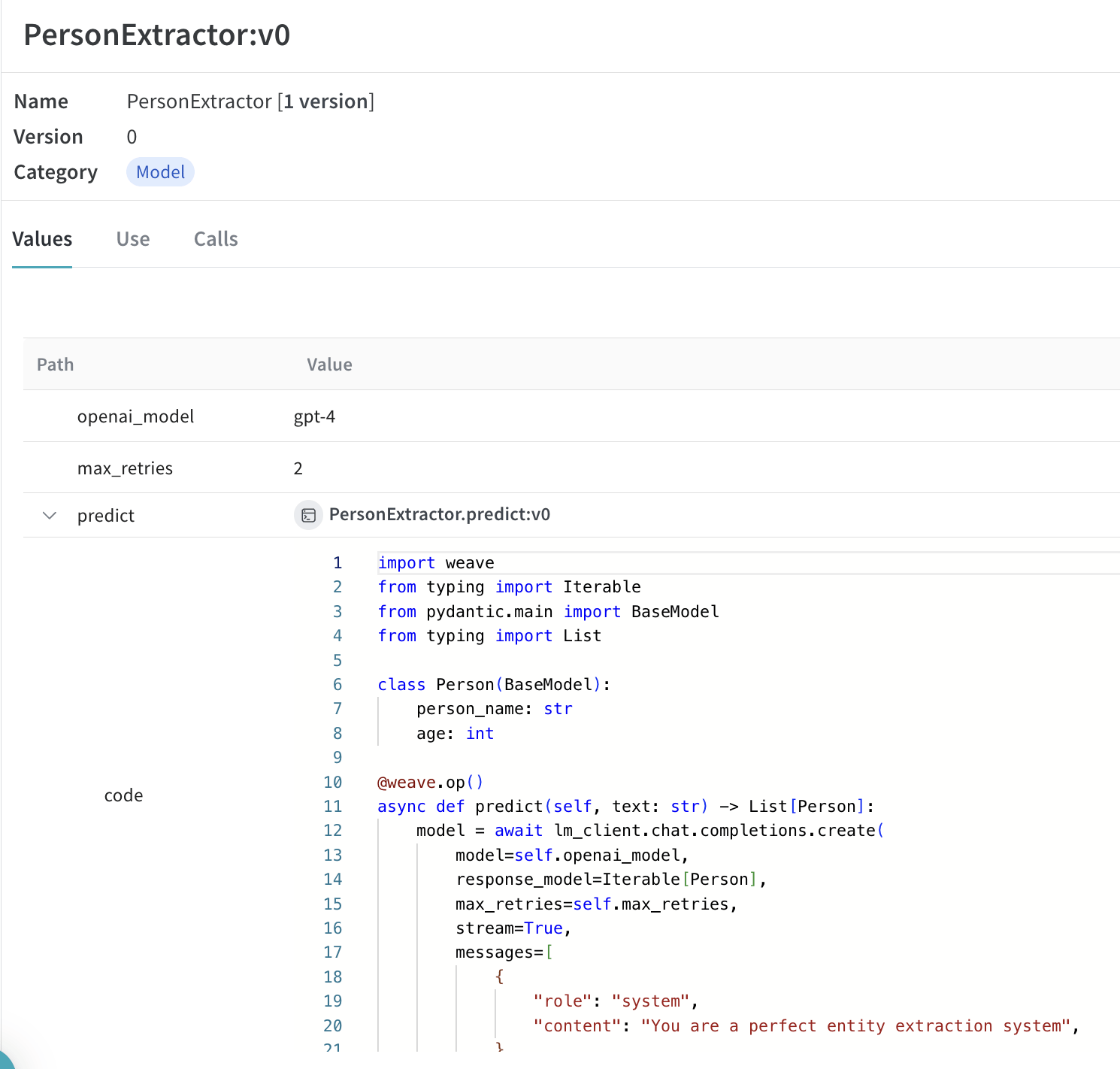
| Tracing and versioning your calls using a [`Model`](../core-types/models) |
## Serve a Weave Model
After you save a `weave.Model`, you can serve it as a FastAPI endpoint to test it from outside the notebook or integrate it with other applications. Given a Weave reference to a `weave.Model` object, you can start a FastAPI server and [`serve`](https://docs.wandb.ai/weave/guides/tools/serve) it.
| [
|
| ------------------------------------------------------------------------------------------------------------------------------------------------------------------------------------------------------------------------------------------------------------------------------------------------------------------------------------------------------------------------------------------------------------------------------------------------------------------------------------------------------------------------------------------------------------------------------------------------------------------------------------------------------------------------------------------------------------------------------------------------------------------------------------------------------------------------------------------------------------------------------------------------------------------------------------------------------------------------------------------------------------------------------------------------------------------------------------------------------------------------------------------------------------------------------------------------------------------------------------------------------------------------------------------------------------------------------------------------------------------------------------------------------------------------------------------------------------------------------------------------------------------------------------------------------------------------------------------------------------------------------------------------------------------------------------------------------------------------------------------------------------------------------------------------------------------------------------------------------------------------------------------------------------------------------------------------------------------------------------------------------------------ |
| Tracing and versioning your calls using a [`Model`](../core-types/models) |
## Serve a Weave Model
After you save a `weave.Model`, you can serve it as a FastAPI endpoint to test it from outside the notebook or integrate it with other applications. Given a Weave reference to a `weave.Model` object, you can start a FastAPI server and [`serve`](https://docs.wandb.ai/weave/guides/tools/serve) it.
| [ ](https://wandb.ai/geekyrakshit/instructor-test/weave/objects/PersonExtractor/versions/xXpMsJvaiTOjKafz1TnHC8wMgH5ZAAwYOaBMvHuLArI) |
| ----------------------------------------------------------------------------------------------------------------------------------------------------------------------------------------------------------------------------------------------------------------------------------------------------------------------------------------------------------------------------------------------------------------------------------------------------------------------------------------------------------------------------------------------------------------------------------------------------------------------------------------------------------------------------------------------------------------------------------------------------------------------------------------------------------------------------------------------------------------------------------------------------------------------------------------------------------------------------------------------------------------------------------------------------------------------------------------------------------------------------------------------------------------------------------------------------------------------------------------------------------------------------------------------------------------------------------------------------------------------------------------------------------------------------------------------------------------------------------------------------------------------------------------------------------------------------------------------------------------------------------------------------------------------------------------------------------------------------------------------------------------------------------------------------------------------------------------------------------------------------------------------------------------------------------------------------------------------------------------------------------------------------------------------------------------------------------------------- |
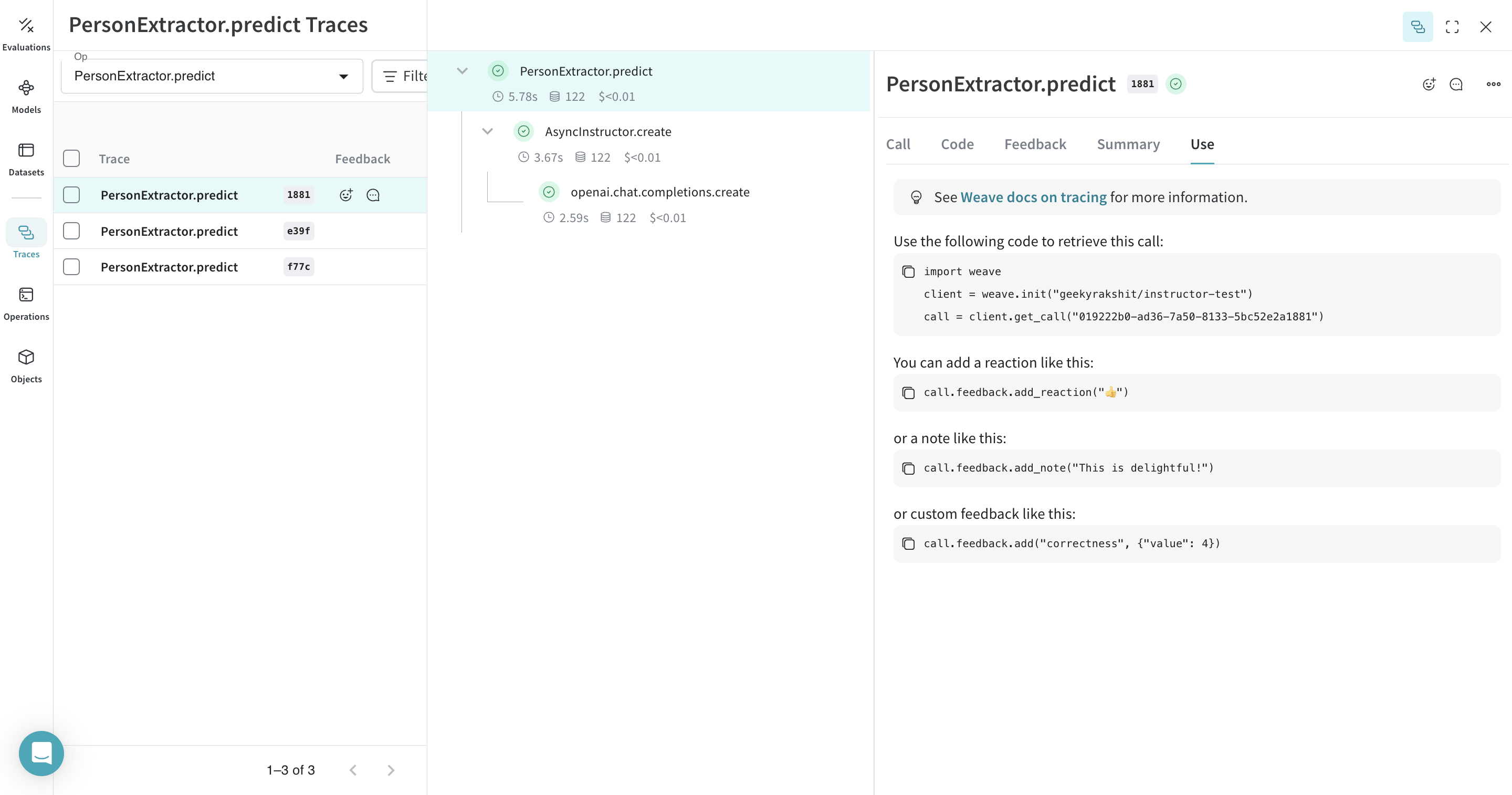
| You can find the weave reference of any `weave.Model` by navigating to the model and copying it from the UI. |
To serve your model, run the following command in your terminal:
```bash theme={null}
weave serve weave://your_entity/project-name/YourModel:[HASH]
```
](https://wandb.ai/geekyrakshit/instructor-test/weave/objects/PersonExtractor/versions/xXpMsJvaiTOjKafz1TnHC8wMgH5ZAAwYOaBMvHuLArI) |
| ----------------------------------------------------------------------------------------------------------------------------------------------------------------------------------------------------------------------------------------------------------------------------------------------------------------------------------------------------------------------------------------------------------------------------------------------------------------------------------------------------------------------------------------------------------------------------------------------------------------------------------------------------------------------------------------------------------------------------------------------------------------------------------------------------------------------------------------------------------------------------------------------------------------------------------------------------------------------------------------------------------------------------------------------------------------------------------------------------------------------------------------------------------------------------------------------------------------------------------------------------------------------------------------------------------------------------------------------------------------------------------------------------------------------------------------------------------------------------------------------------------------------------------------------------------------------------------------------------------------------------------------------------------------------------------------------------------------------------------------------------------------------------------------------------------------------------------------------------------------------------------------------------------------------------------------------------------------------------------------------------------------------------------------------------------------------------------------------- |
| You can find the weave reference of any `weave.Model` by navigating to the model and copying it from the UI. |
To serve your model, run the following command in your terminal:
```bash theme={null}
weave serve weave://your_entity/project-name/YourModel:[HASH]
```